
GEAR GUIDE / EXPEDITION POWER
HOW I POWER STARLINK ON EXPEDITIONS
My setup for keeping Starlink Mini running at remote mountain base camps, and occasionally taking internet all the way to the high camps.
OUTDOOR PIRATE · EXPEDITION POWER
FIELD NOTES / 01
Starlink has become one of the most useful pieces of equipment I take on expeditions.
Most of the time it lives at Base Camp, where I use it for uploading footage, live streams, communicating with friends and family, streaming and everyday internet access. When you’re living on a mountain for weeks at a time, having a reliable connection makes a huge difference.
But Base Camp isn’t always where it stays.
On rotations, particularly when I know we’re going to spend several days sitting around at a high camp, we’ll sometimes split the entire Starlink setup between a group of climbers and take it with us.
The highest I’ve taken it so far was Camp 3 on Annapurna. We’ve also carried it to high camps on other mountains, including when Xenia and I took it up Popocatépetl in Mexico.
On a summit push, however, it normally stays behind. At that point, every gram matters and Starlink is unnecessary weight.
EXPEDITION COMMUNICATIONS
MORE THAN JUST INTERNET
Starlink isn’t just there so I can upload YouTube videos or browse the internet from Base Camp. It has increasingly become part of my expedition communications and safety setup.
I saw how valuable that could be firsthand on Annapurna.
When Dawa had his accident high on the mountain, having Starlink at Base Camp allowed us to communicate quickly with the people involved in the response. We could call and message first responders, communicate with medical teams, help coordinate helicopters and keep information moving while the rescue was unfolding.
In an emergency, that ability to communicate quickly can be incredibly valuable.
Before systems like Starlink, expeditions operating in remote areas were much more reliant on satellite phones for this type of communication. Satellite phones still have an important place in an expedition communications plan, but I’ve found them cumbersome and expensive compared with having a high-speed internet connection available at Base Camp.
Starlink also gives us far more than a voice connection. We can send messages, share information, communicate with multiple people simultaneously and access online resources from somewhere that would otherwise have almost no connectivity.
For me, that means Starlink is no longer simply a convenience I take to the mountains.
“IT HAS BECOME ANOTHER TOOL IN THE EXPEDITION SAFETY SYSTEM.”
~4 HOURS
PER UGREEN BATTERY
100W
SOLAR PANEL
3×
POWER BANKS
~6KG
COMPLETE MOBILE SETUP
THE SYSTEM
MY STARLINK SETUP
The system is deliberately simple, portable and redundant enough that one failed cable doesn’t take the entire communications setup offline.
Starlink
Starlink Mini
Compact satellite internet that keeps me connected from remote base camps. Use my referral link when ordering Starlink and you’ll receive one free month of service. If the referral qualifies, Starlink pays me $110.
UGREEN
UGREEN Nexode 25,000mAh 200W Power Bank
High-capacity 200W power bank I use to keep Starlink, cameras and other expedition electronics running away from mains power.
QUANTITY CARRIED: 3
STARGEAR
STARGEAR 140W USB-C Starlink Mini Cable
USB-C power cable that lets me run the Starlink Mini directly from my expedition power banks without carrying the standard Starlink power supply.
QUANTITY CARRIED: 2
FlexSolar
FlexSolar 100W Folding Solar Panel
Portable 100W folding solar panel I use to recharge expedition power banks when generator or mains power isn't available.
ChubbyCable
240W Fast Charging Cable
Robust high-power charging cables I carry in assorted lengths for expedition electronics, including a 3m cable in my Starlink setup.
The Starlink Mini itself is essentially stock other than being kept in a small protective rubber case.
HOW I KEEP IT RUNNING ALL DAY
At Base Camp, Starlink normally goes on pretty much as soon as I wake up.
Before the sun reaches camp, I’ll run it from one of the UGREEN batteries. I’ve found that a 25,000mAh battery gives me approximately four hours of runtime, so with three batteries I have roughly 12 hours of stored power available.
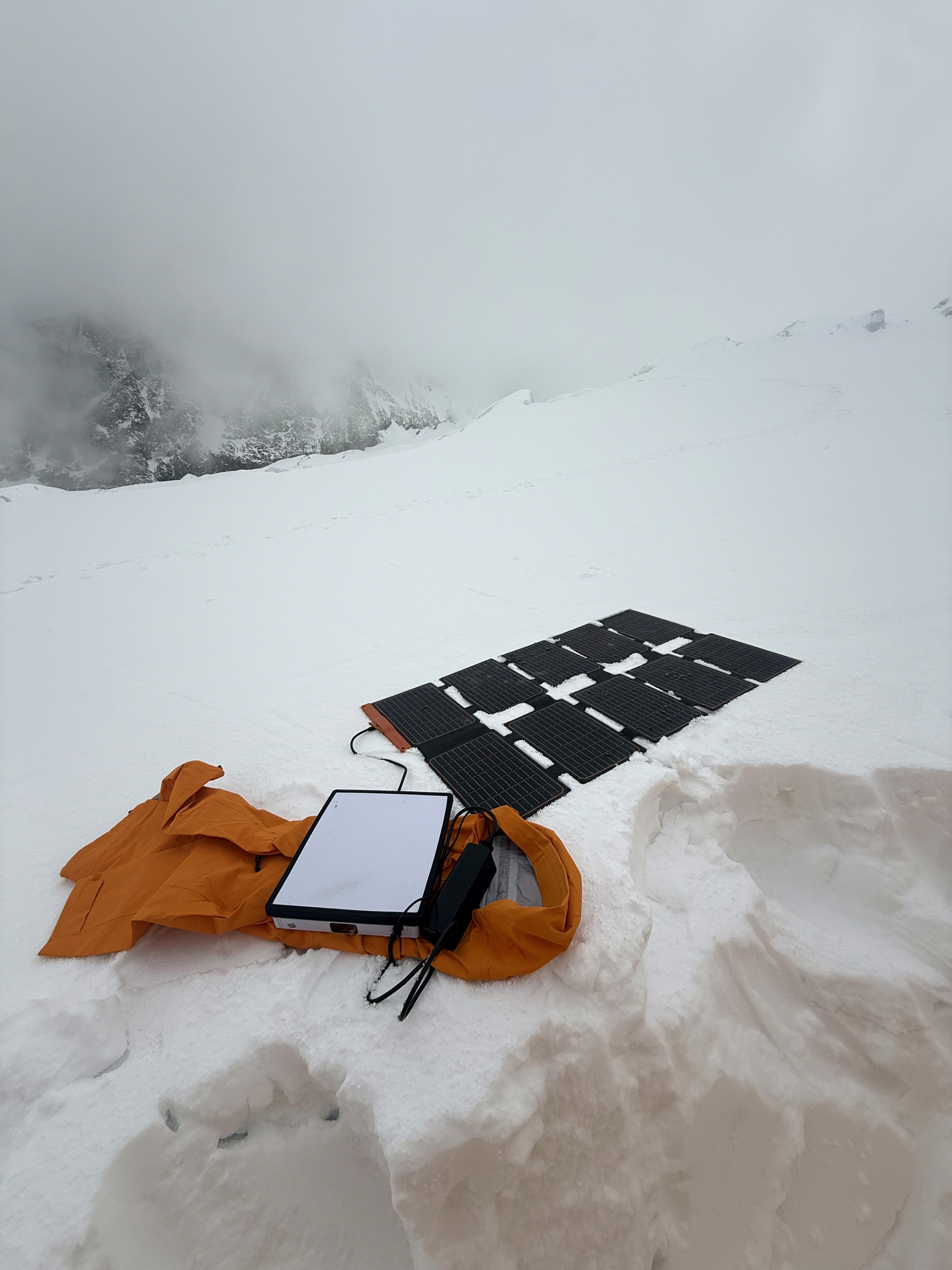
Once the sun reaches us, the FlexSolar panel comes out.
In good weather and clear sunlight, I’ve found the 100W panel can actually produce more power than Starlink is consuming. That changes the whole equation because instead of continually draining batteries, I can sometimes keep one battery powering the system through most of the daylight hours while still maintaining its charge.
The remaining batteries then cover the early morning, poor weather and evening.
Usually around 9–10pm, when I’m going to bed, I’ll shut Starlink down rather than waste battery power keeping it online throughout the night.
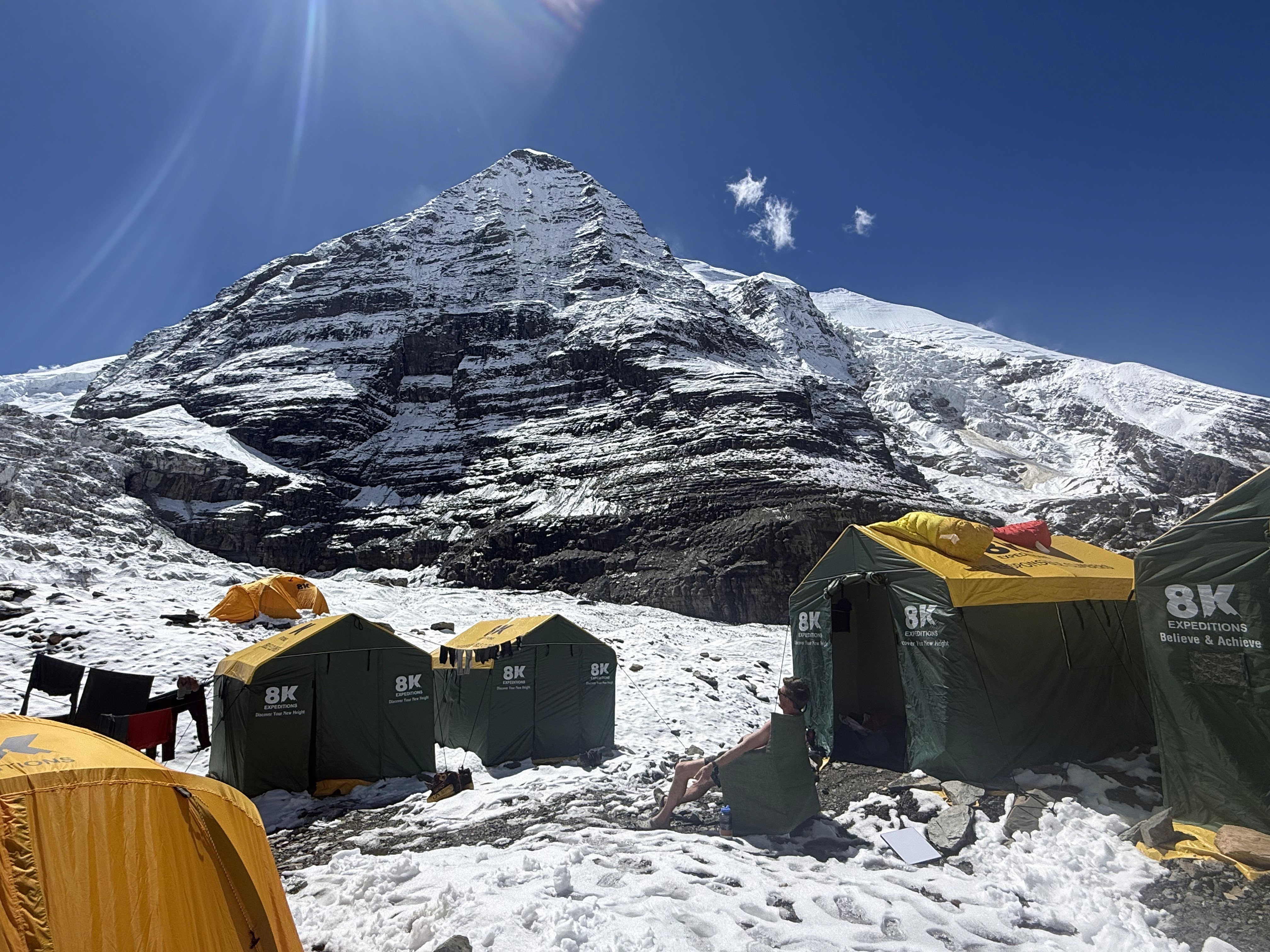
SOLAR CHANGES EVERYTHING
Without solar, I’d be entirely dependent on stored battery capacity and the Base Camp generator.
The FlexSolar 100W panel makes the system much more self-sufficient.
On a clear Himalayan day, there can be enough solar production to run Starlink while maintaining or adding charge to the connected battery. That means my three power banks become much more of a buffer for mornings, evenings and bad-weather days.
There is a downside.
I’ve already had a FlexSolar panel fail on an expedition. They’re relatively fragile, so I’ve learned to be much more careful with how I handle, fold and pack them.
ALWAYS CARRY A SPARE CABLE
This is one lesson I’ve learned the hard way.
Starlink power cables fail.
Alongside the STARGEAR cable, I carry ChubbyCable 240W Fast Charging Cables in assorted lengths, including a 3m cable for the Starlink setup. They’re robust enough for constant travel, and the bright colors make them easy to identify in crowded charging stations.
There’s no point carrying kilograms of Starlink, batteries and solar equipment into a remote mountain environment only to have the entire system rendered useless by one small cable.
REDUNDANCY MATTERS.
WHEN THE GENERATOR STARTS, EVERYTHING CHARGES
On many expeditions our Base Camp generator only runs for limited periods, typically around two hours in the morning and another two hours in the evening.
I treat those periods as charging windows.
All three UGREEN batteries get plugged into my Anker Prime 200W 6-Port GaN Charger, while Starlink itself runs directly from generator power.
The goal is simple: use generator power while it’s available and save stored battery capacity for when it isn’t.
It’s also why I use the Anker Prime 200W 6-Port GaN Charger. When you’ve only got a couple of hours of generator time, being able to charge several devices simultaneously is far more useful than carrying multiple small wall chargers.
“WHEN GENERATOR POWER IS AVAILABLE, CHARGE EVERYTHING.”
BATTERIES DON’T LIKE THE COLD
Cold is another problem.
I’ve found the UGREEN batteries don’t particularly like very low temperatures, so keeping them warm becomes part of managing the system.
In the evening, I keep my electronics together in a charging bag. Overnight, the batteries are kept warm, sometimes inside a sleeping bag or alongside a hot-water bottle.
It might sound excessive until you’re somewhere remote and realize how dependent your communications, cameras and other electronics have become on those batteries.
TAKING STARLINK TO THE HIGH CAMPS
The entire setup weighs roughly six kilograms, so carrying it higher isn’t something I do casually.
But if there are enough people interested, it becomes manageable.
With six to ten climbers or Sherpas, we can split everything up. Someone carries a battery, someone takes the Starlink, someone takes the solar panel and the remaining equipment gets distributed between the group.
The highest I’ve taken the system so far is Camp 3 on Annapurna.
It’s also been to high camps on several other mountains, including Popocatépetl in Mexico.
I generally won’t carry it during a summit push. At that point the additional weight isn’t worth it.
Rotations are different.
If you know you’re going to spend a couple of days sitting around at a high camp acclimatizing, there’s a lot of downtime. Having Starlink suddenly means we can communicate, stream, upload content or simply kill some of the boredom while waiting around.
EXPEDITION TRAVEL
STARLINK ON THE ROAD
Getting to and from mountains often involves long drives in questionable vehicles, buses and 4WDs through very remote areas.
I carry the STARGEAR Starlink Mini Car Adapter so I can run Starlink directly from a vehicle.
We usually just prop the Starlink Mini on the dashboard, plug it into the 12V socket and let it run.
It makes long travel days considerably more enjoyable because suddenly everyone in the vehicle has internet instead of spending hours completely disconnected.
It can also be genuinely useful.
In Chile, we had a long drive from Copiapó deep into the Atacama Desert on the way to Ojos del Salado. We were travelling through extremely remote country, and having Starlink available in the vehicle was invaluable for navigation and communication when we were effectively in the middle of nowhere.
It’s one of those small pieces of kit that doesn’t look particularly exciting, but I’ve found it incredibly useful on expedition travel days.
NEXT ITERATION
WHAT I’M UPGRADING NEXT
PLANNED UPGRADE
ANKER PRIME 250W 6-PORT GANPRIME CHARGER
MODEL A2345
I currently use the Anker Prime 200W 6-Port GaN Charger, but I plan to upgrade to the 250W version. The extra output is useful, but the feature I’m particularly interested in is the display. When I’m trying to charge several batteries during a limited generator window, I want to be able to see exactly how much power is going to each port rather than guessing.
PLANNED UPGRADE
OUTCAMP STARLINK MINI REMOTE POWER SWITCH
This is another small upgrade I’m planning to add when I get home. It allows me to remotely switch the Starlink Mini on and off. That might sound like an unnecessary luxury until you’re warm inside a sleeping bag at 9pm, it’s freezing outside, and you realize you need to get up just to turn Starlink off. I’d rather press a button from my sleeping bag.
DIRECT
BASE CAMP LESSONS
KEEP IT INSIDE YOUR TENT.
I used to leave the Starlink visible outside.
The problem is that as soon as everyone at Base Camp realizes you have internet, you suddenly have a very large number of new friends asking for the Wi-Fi password.
These days I normally keep the Starlink inside my tent. The solar panel stays outside, so as far as everyone else knows I’m simply charging batteries.
Of course, if you want to make friends at Base Camp, handing out the Starlink password works remarkably well.
AFFILIATE DISCLOSURE
Some links in this guide are affiliate links. If you purchase something through one of these links, I may earn a commission at no additional cost to you. I only feature equipment I genuinely use or recommend, and affiliate relationships don’t determine what makes it into my kit.
As an Amazon Associate I earn from qualifying purchases.
